How to Change Your Free Fire Name with Stylish Symbols (2026 Guide)
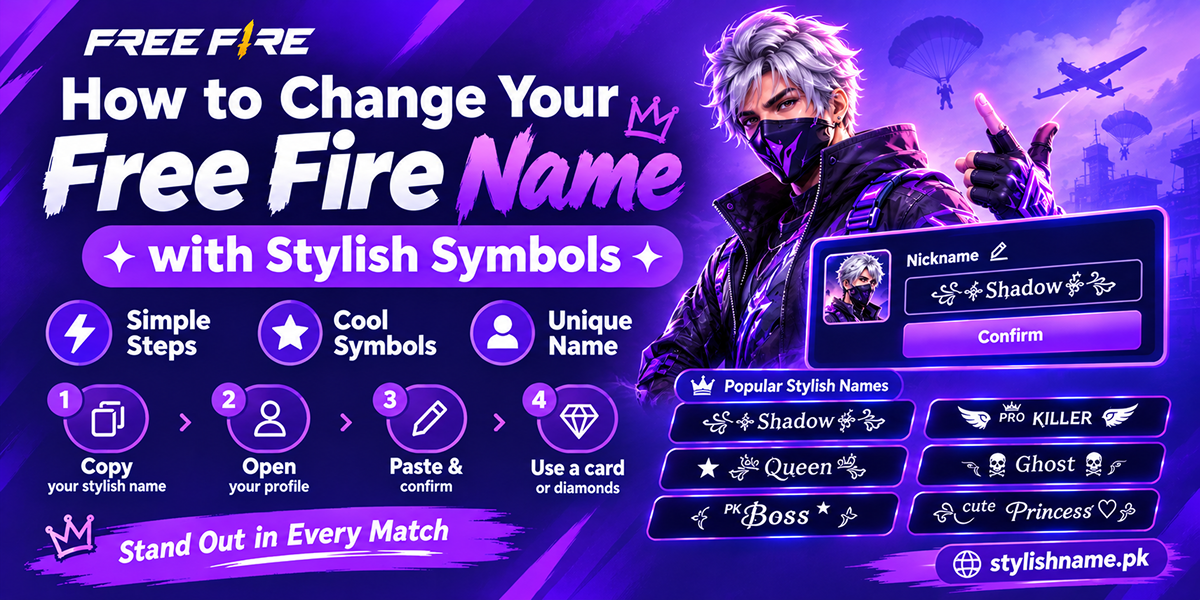
You open Free Fire, look at your plain name, and think: everyone else has crowns and wings around their name. Why not me? Good news. Changing your Free Fire name with stylish symbols takes about two minutes. You just need the right symbols, a little patience with the character limit, and either a Name Change Card or some diamonds.
This guide walks you through it step by step. You will also get ready-made names you can copy and paste, a list of symbols that usually work in the game, and fixes for the most common problems.
What you need before you start
Do not jump into the game yet. Get these three things ready first. It saves time and diamonds.
- Your new name, already copied. Make it in a generator or pick one from the lists below. Keep it on your clipboard.
- A Name Change Card or diamonds. A card makes the change free. Without one, the game asks for diamonds. The price is shown on the screen before you pay, so check it there.
- A backup plan. Some names are already taken. Some symbols get rejected. Keep two or three versions ready so you are not stuck.
How to change your Free Fire name (step by step)
- Copy your stylish name. Go to the Free Fire names page, type your name, and tap the style you like. It copies to your clipboard.
- Open Free Fire and wait for the lobby to load fully.
- Tap your profile picture in the top-left corner of the lobby. Your profile page opens.
- Tap the pencil (edit) icon next to your current nickname.
- Clear the old name and long-press the text box. Tap Paste.
- Check the preview. Look for empty boxes (▯) or question marks. If you see them, that symbol is not supported. Remove it.
- Confirm. Pay with your Name Change Card if you have one. If not, the game shows the diamond cost. Tap confirm.
- Go back to the lobby. Your new name now shows on your profile, in squads and in the kill feed.
That is it. If the game says the name is invalid or taken, do not worry. Scroll down to the troubleshooting section.
The character limit: the part most people get wrong
Free Fire nicknames have a short length limit. Most players report a limit of around 12 characters, but it can change with updates. Here is the tricky part. Some fancy letters are not "one character" to the game.
Plain letters like A count as one. But many styled letters, such as 𝓐 or 𝕬, are stored as two hidden units. So the game may count them twice. That is why a name that looks short can still be "too long".
Simple rules that work:
- Use styled letters for a short word only, like your main name.
- Put the decoration on one side, not both, if space is tight.
- Small caps (ᴀʙᴄ) and superscript letters (ᵃᵇᶜ) are usually lighter than bold script letters.
- Test your name in the box before you pay. The game blocks you if it is too long, so you do not lose anything by trying.
Symbols that usually work in Free Fire
Tap a box to select it, then copy. These are popular because they show up well on most Android phones and iPhones.
| Type | Symbols | Good for |
|---|---|---|
| Wing brackets | ꧁ ꧂ ༺ ༻ | Wrapping your full name |
| Crowns & royalty | ♛ ♚ 👑 ♕ | King and queen names |
| Weapons | ⚔ ︻デ═一 ▄︻┻═┳一 | Sniper and attitude names |
| Danger | ☠ 💀 ☬ 𒆜 | Devil and killer names |
| Stars & sparkles | ★ ✧ ✿ ࿐ ༄ | Cute and soft names |
| Tags | ᴾᴿᴼ ᵀᵉᵃᵐ ˣˣ 々 メ | Pro tags and guild tags |
| Hearts | ♡ ❤ ღ 🩷 | Girls' names and couples |
Need more? Our symbols page has hundreds more, and the stylish keyboard lets you build a name letter by letter.
Ready-made Free Fire names to copy and paste
Swap in your own name where you see one. Keep an eye on the length.
For attitude and pro players
- ꧁༒☬Sʜᴀᴅᴏᴡ☬༒꧂
- ᴾᴿᴼ々KILLER
- ▄︻デViper═一
- ☠Gʜᴏsᴛ☠
- ˣˣ Rᴇʙᴇʟ ˣˣ
For girls
- ᶜᵘᵗᵉ Pʀɪɴᴄᴇss ♡
- ✿Qᴜᴇᴇɴ✿
- ᵐⁱˢˢ Aʏᴇsʜᴀ ࿐
- ♕Lᴜɴᴀ♕
Pakistani style names
- ᴾᴷ々Hᴀᴍᴢᴀ
- ♛Kʜᴀɴ♛
- ꧁Aʟɪ꧂
- ᴾᴷ Bᴏss ★
Want something built around your own name? Try the name styles page. It has ready designs for common Pakistani names like Ali, Ahmed and Fatima. For darker looks, see the devil names, and for soft ones, the cute names.
A simple formula for your own unique name
Copying a popular name is quick, but someone may already have it. Build your own instead. Use this pattern:
Examples:
- Tag
ᴾᴿᴼ+ wordFᴀʟᴄᴏɴ+ symbol⚡gives ᴾᴿᴼFᴀʟᴄᴏɴ⚡ - Tag
ᵀᵉᵃᵐ+ wordSᴛᴏʀᴍ+ symbol★gives ᵀᵉᵃᵐSᴛᴏʀᴍ★ - No tag + word
Zᴀɪɴ+ wings gives ꧁Zᴀɪɴ꧂
Pick a word you like. Your nickname, your city, or an animal all work. Short words leave more room for symbols.
Problems and how to fix them
"Name already exists"
Someone has it. Add a small tag like ᴾᴷ or ˣˣ, change one symbol, or switch one letter to a different font.
"Invalid name" or "too long"
Remove one decoration. Swap bold script letters for small caps. Then try again.
Symbols show as boxes ▯
Your phone's font does not have that symbol. Other players may see boxes too. Pick a different symbol from the table above.
Paste does not work
Copy again from the generator. Long-press inside the name box, not outside it. On some phones, tap the box once first.
Tips before you spend diamonds
- Do not use bad words or rude names. The game can block or reset names that break its rules.
- Think about readability. Friends need to find you. If your name is all symbols, nobody can search for it.
- Match your guild. Many squads use the same tag, like ᵀᵉᵃᵐ or a short clan code. It looks clean in the kill feed.
- Save your name somewhere. Keep a copy in your notes app. You will need it for other games or for your TikTok and Instagram profiles.
- Playing PUBG too? The same idea works there. See our PUBG stylish names.
New to fancy text? Read what stylish names are and how they work for a quick background.
Frequently asked questions
Make your Free Fire name now
Hundreds of styles, ready to copy. No app needed.